
Twilio
Connect a Twilio account in under a minute. CommSync imports your numbers and sets up the webhooks, with no work in the Twilio Console.

Twilio
Paste your Account SID and Auth Token, and CommSync imports your numbers and sets up the webhooks.
Twilio is the fastest way to send and receive texts in CommSync. You do the whole setup inside CommSync, and you do not change anything in the Twilio Console.
Phone providers explains what every connection does. This page adds what Twilio does differently.
Before you start
- A Twilio account, or a subaccount, with at least one number that can text.
Good to know
- The credentials of a subaccount work too. Connect each subaccount with its own SID and token.
- CommSync sets up the Twilio webhooks for you. You do not change anything in the Twilio Console.
- CommSync encrypts the Auth Token at rest (AES-256-GCM).
Connect Twilio
Open Settings → Phone numbers and pick Twilio.
Use your Account SID and Auth Token
With no account yet, the Twilio card opens the connect page. Otherwise, click Connect Twilio on the Twilio page.
Open the Twilio Console
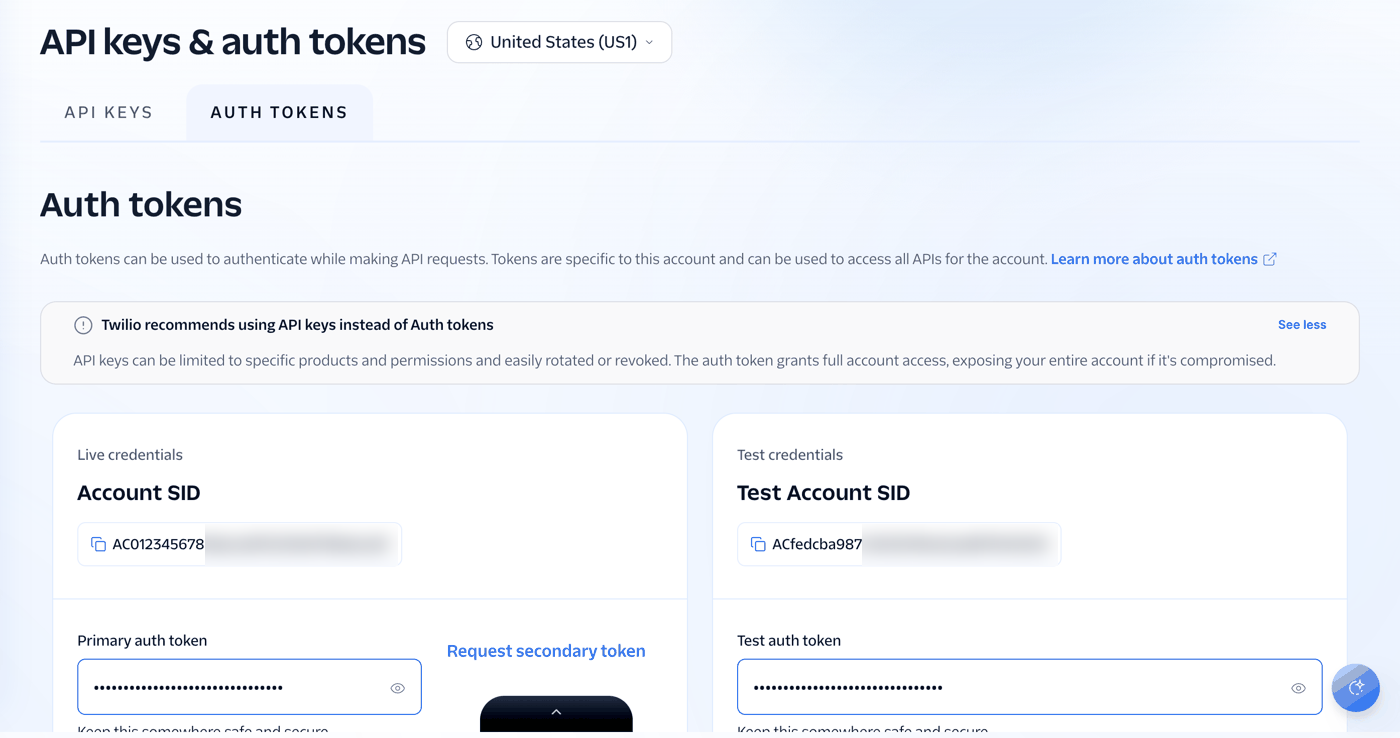
Go to Account settings → API keys & auth tokens. You can also search for “auth tokens”.
Copy the Account SID
It is under Live credentials, and it starts with AC.
Copy the Auth Token
Click the eye icon next to the Primary auth token to show it. Then copy it.
Keep both values ready
The next page asks for them.
Paste your Account SID and Auth Token
The next page asks for the two values only. CommSync checks them with Twilio before it saves anything, and it encrypts the token at rest. The credentials of a subaccount work too. Connect each subaccount on its own, and connect as many accounts as you like.
Finish in CommSync
Pick the lines
CommSync lists every number on the account with its capabilities (SMS, MMS, or Voice). Pick the numbers that you want in your inbox. CommSync cannot import a number that can only take calls.
You do not need a name: CommSync uses the name of your Twilio account, and you can change it.
CommSync sets up live updates
On import, CommSync points the inbound webhook of each number at itself over the Twilio API. Texts arrive at once, photos included. You do not change anything in the Twilio Console.
Choose how much history to import
Twilio keeps your full message history. The History step offers to import it: pick a window (7 days to all time), or live sync only. Old conversations land in threads by contact, the same as live ones.
Decide later keeps the choice open. Then the account shows History choice waits, and Choose history in the account menu opens it again. If the account has no numbers yet, CommSync keeps your choice and runs the import when you add the first number.
How the webhook works
Twilio needs no manual webhook setup. When you import a number, CommSync sets its inbound SMS webhook via the Twilio REST API. Every outbound message also carries a status callback, so delivery receipts flow back automatically.
Twilio’s X-Twilio-Signature header (HMAC-SHA1 keyed on your auth token) authenticates every webhook request; CommSync rejects any request that fails validation.
As a safety net, CommSync also reconciles each Twilio account every few minutes through the Messages API. This way, a missed webhook delivery — or a text sent from the Twilio console — still lands in your inbox.
What syncs
- CallsCalls
- VoicemailVoicemail
- PicturesPictures, up to 10
- Group textsNo group replies
- Delivery receiptsDelivery receipts
- History importImports past texts
What makes Twilio lines different
Twilio reports real per-message delivery receipts, so a sent text shows the truth. It shows Sent when Twilio accepts the text, then Delivered (or Failed, with the carrier’s reason — for example, “Recipient has opted out”) seconds later. CommSync captures inbound MMS media as attachments on the message. Texts sent from the Twilio console or other tools on the same number also appear in the thread within a few minutes.
Calls and voicemail
- Calls. Twilio reports each finished call, and CommSync shows it as a row in the conversation.
- Voicemail. CommSync transcribes each voicemail with AI, from your AI credits.
- Call transcripts. Twilio shares no transcript of a call.
- Call summaries. Twilio shares no summary of a call.
- Recordings. A call row carries its recording, when Twilio kept one.
Call logs sync automatically for every imported Twilio number, in both directions, through the 5-minute reconcile.
Set up voicemail
Voicemail is different. Twilio has no built-in voicemail, so CommSync provides one — and it is off by default. When you turn it on, CommSync points the voice webhook of the number at itself. That replaces any call flow the number had, so it is an explicit, per-number choice.
To turn it on:
- Open Settings → Phone numbers → Twilio.
- Find the number in its account card.
- Select Set up voicemail.
- Turn on Answer missed calls.
- Review the greeting, and then select Save changes.
You can also write a custom greeting. The default greeting is “Sorry we missed your call. Please leave a message after the tone.”
You can also enable voicemail when you connect a Twilio account. Select the numbers to import. Then turn on Set up CommSync voicemail. CommSync applies the greeting to each selected voice-capable number. The same option appears when you add numbers later.
Each number row on the Twilio page shows Voicemail on or Set up voicemail. Click it, or pick Voicemail settings in the menu of the row. The Manage numbers dialog also shows the current state and a Configure action. Use any of them to change the greeting or turn voicemail off.
While voicemail is on, CommSync answers each inbound call with the greeting. It records up to three minutes after the tone. It then drops the voicemail into the caller’s conversation. A caller who hangs up before the tone appears as a missed call. When you turn voicemail off, CommSync clears the Twilio voice webhook. The clear only happens while the webhook still points at CommSync — a webhook you repointed elsewhere stays untouched.
CommSync voicemail needs a server with a public URL, because Twilio must reach the voice webhook. Cloud deployments have one; a local development server does not.
See calls and voicemail for how a call reads in the inbox.
Limits
- Pictures you send: up to 10 per text, 5 MB in total.
- Group replies: none. A group conversation says “Reply to this group in Twilio.” in place of the reply box.
When something needs your attention
The account card in Settings → Phone numbers shows the state of the account, and each error names the one thing to do.
| What you see | What it means | What to do |
|---|---|---|
| Reconnect needed | Twilio no longer accepts the saved Auth Token, for example after you changed it in Twilio. | Open the account menu on the Twilio page (the … button, or a right-click on the card), and pick Change the Auth Token. CommSync checks the new token with Twilio before it saves it. |
| History choice waits | You picked Decide later on the History step. | Pick Choose history in the account menu. |
Manage numbers in the account menu also removes a number. When you remove a number, CommSync clears the webhook of the number again. It only does this if the webhook still points at CommSync, so CommSync never touches a webhook you have since repointed elsewhere.
On a Twilio account, the Access control on the account header covers every number on that account.